Best 3D Printer for Miniatures in 2026
Resin 3D printers ranked for tabletop miniature detail: pixel size, tilt-release vats, and first-print success — plus the ventilation rules.
Updated · We may earn a commission from links on this page. How that works
Our top picks
 Check price on Amazon
Best overall
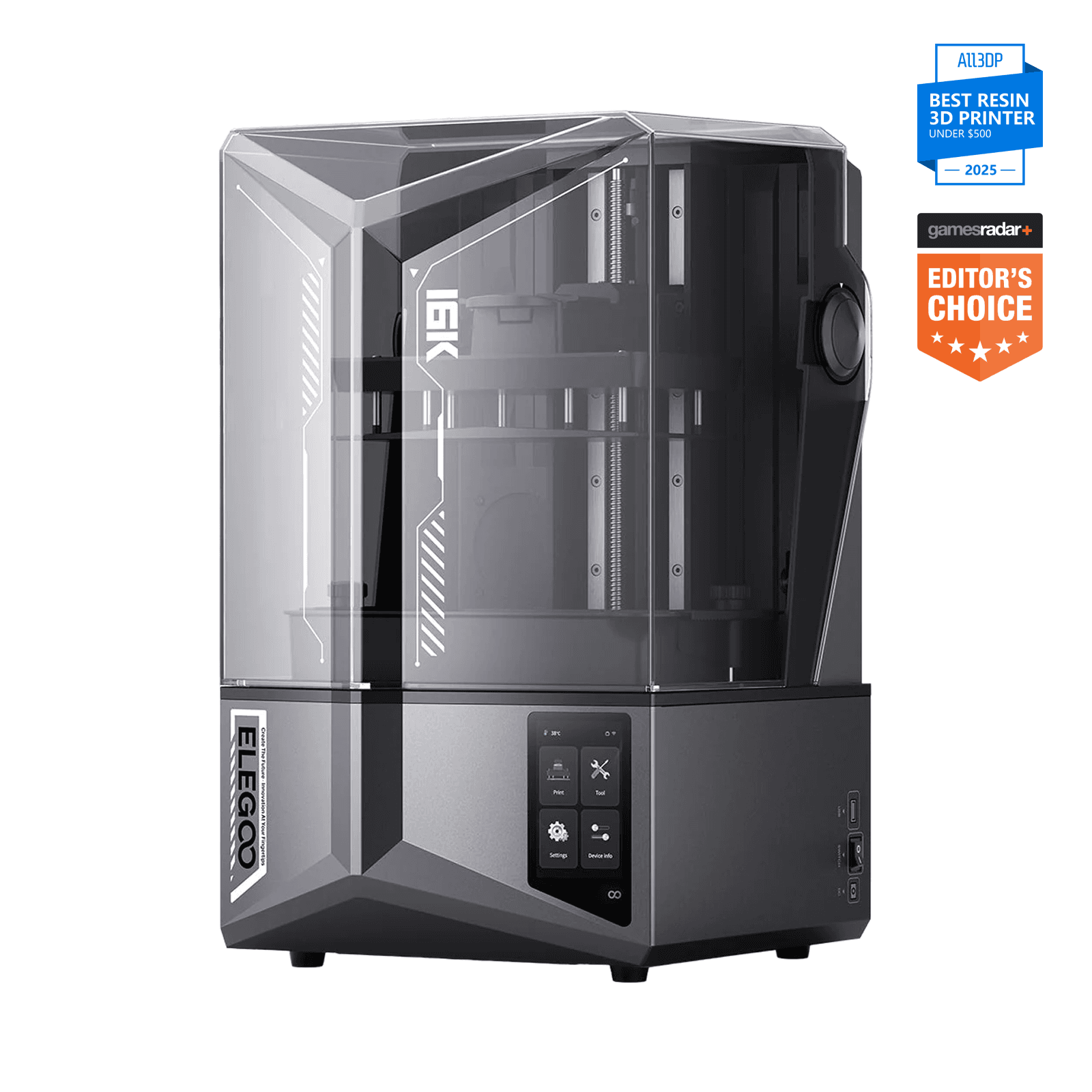
Elegoo Saturn 4 Ultra 16KThe sharpest, most complete miniature printer you can buy right now. If the budget stretches to ~$500, stop here.
 Check price on Anycubic
Best for batch printing
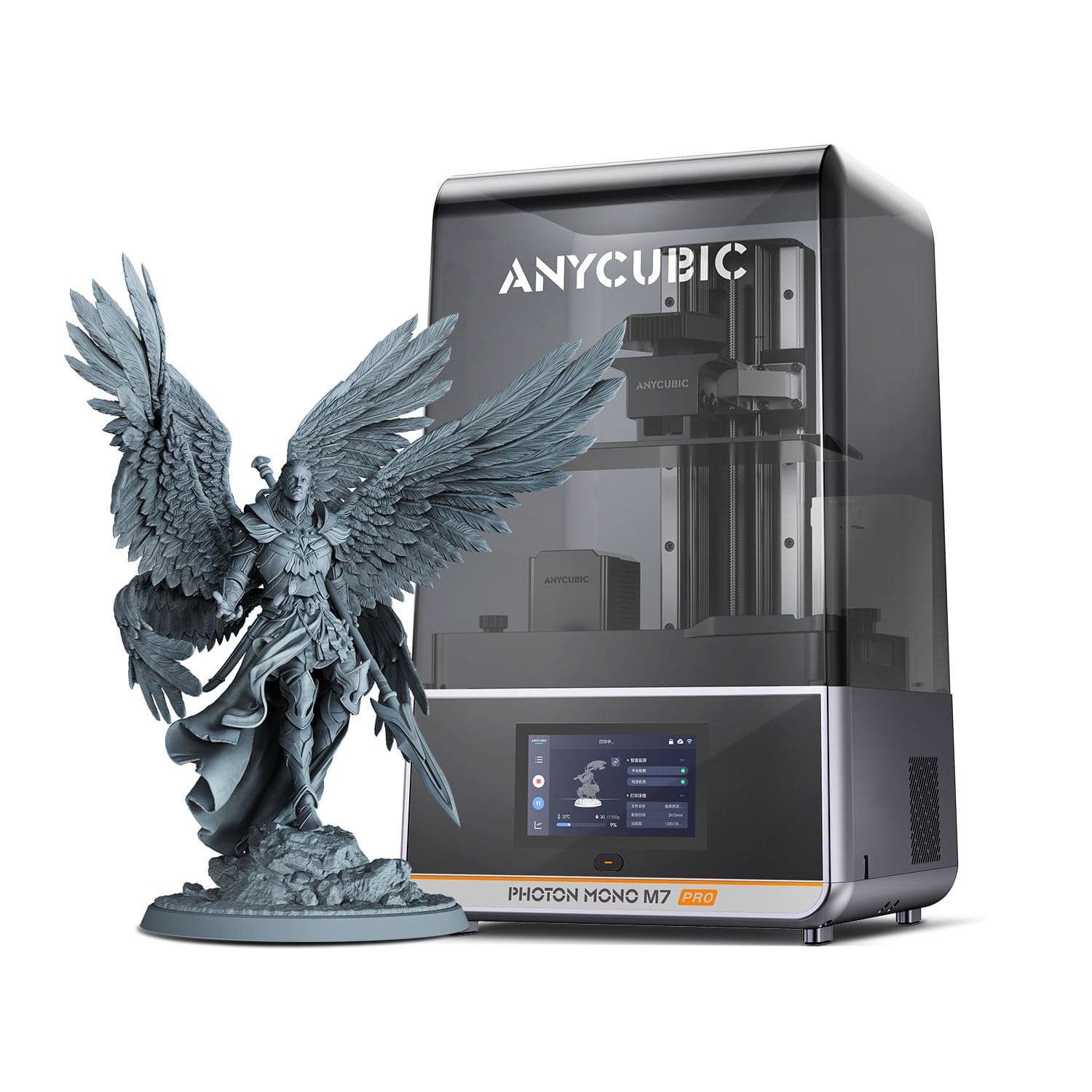
Anycubic Photon Mono M7 ProThe army printer. Maximum figures per run with the most hands-off resin handling — accept the pump as a maintenance item.
 Check price on Elegoo
Best value
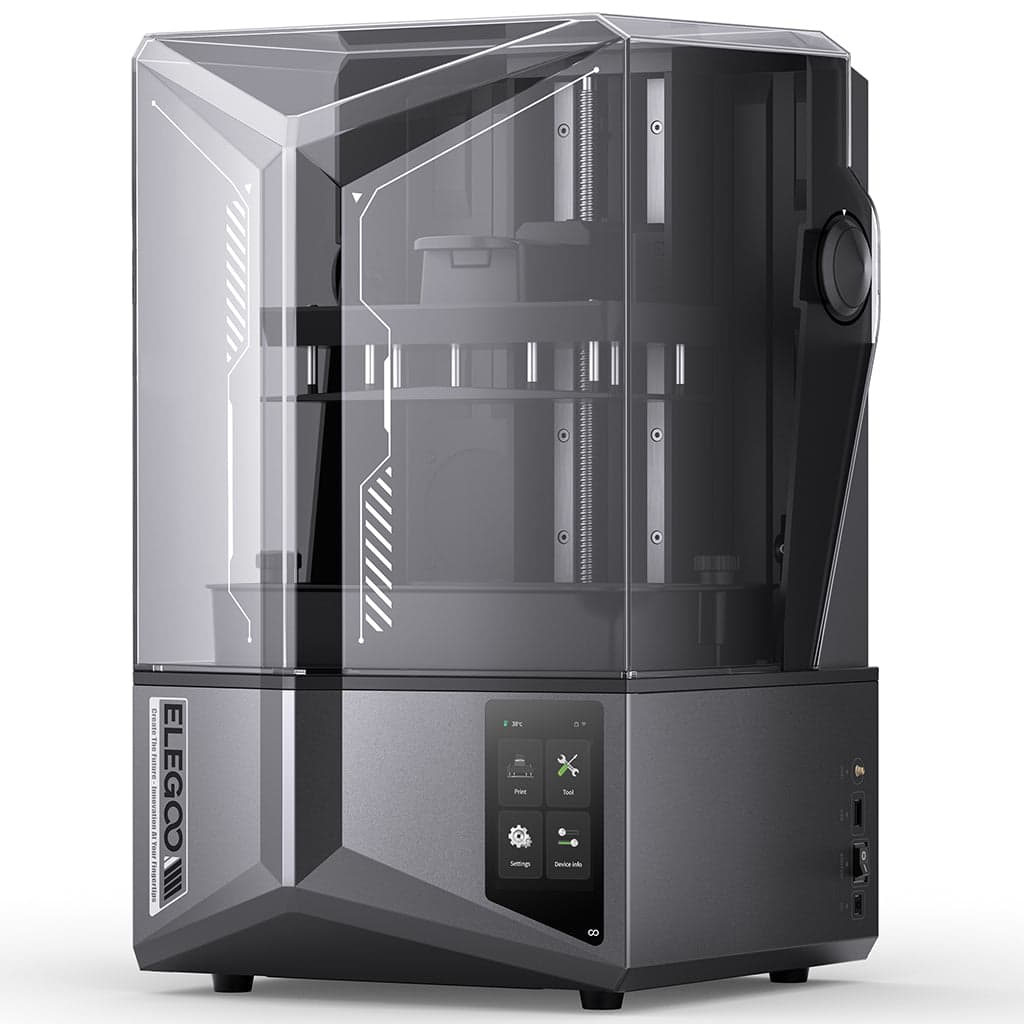
Elegoo Saturn 4 Ultra 12KBuy the 12K unless you specifically paint display-scale miniatures — this is where the value curve peaks.
 Check price on Amazon
Best budget gateway
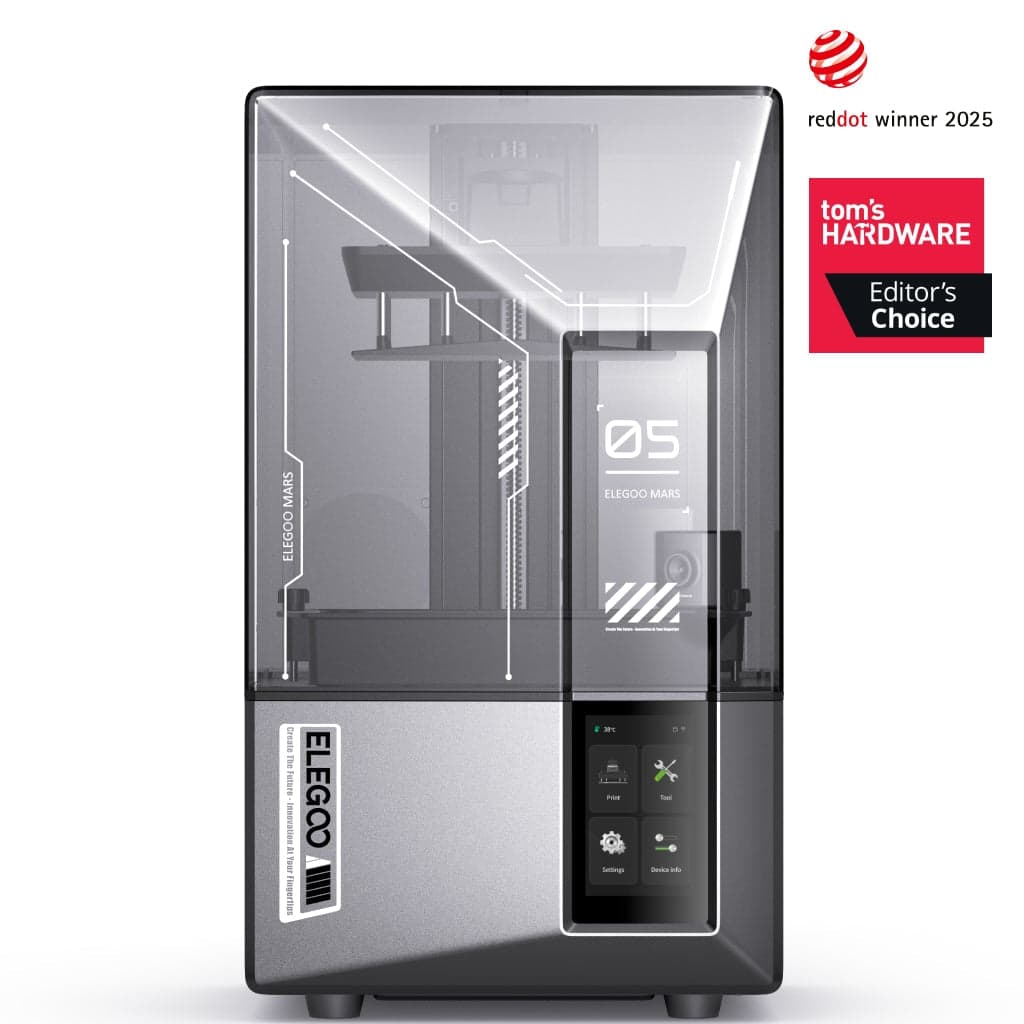
Elegoo Mars 5 UltraThe honest starter machine. Buy it to find out if resin printing is your hobby — upgrade later with no regrets.
 Check price on Phrozen
Detail specialist
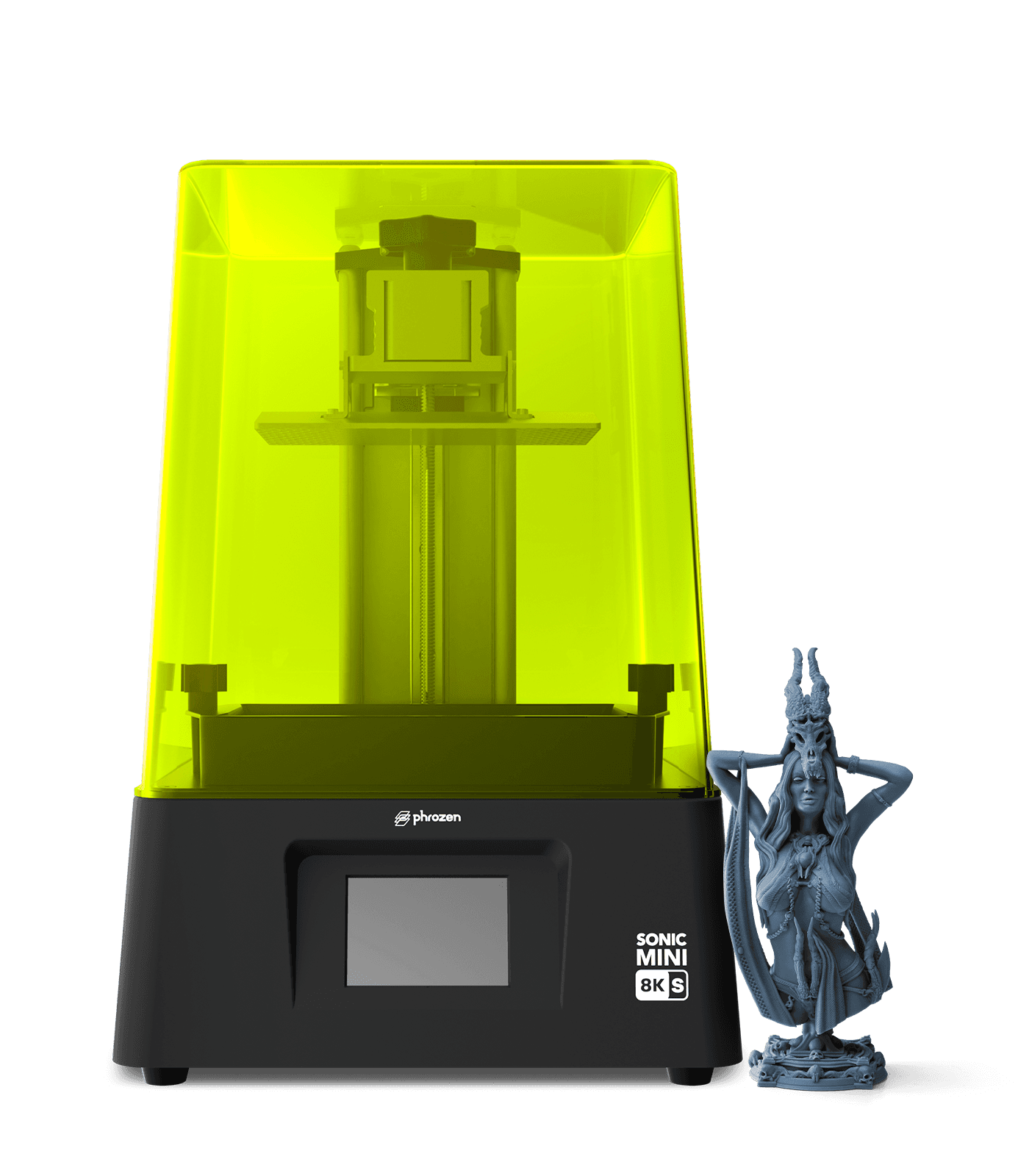
Phrozen Sonic Mini 8K SThe figure painter's specialist. Not the biggest or the most automated — the most focused on small-scale detail per dollar.
If you want to print tabletop miniatures — 28 mm soldiers, display busts, dungeon scatter terrain — buy a resin printer, not an FDM printer. This is the one corner of 3D printing where the technology choice is settled: resin (MSLA) printers cure liquid photopolymer with UV light shining through an LCD screen, and they resolve detail an FDM nozzle physically cannot. Layer lines that are invisible on a phone stand become glaring ridges on a miniature's face.
That makes this guide different from our other printer guides. Top speed barely matters — a build plate of figures cures one whole layer at a time, so ten miniatures take barely longer than one. Pixel size matters most. The metric to learn is XY resolution: the physical size of each LCD pixel in micrometers. Smaller pixels resolve sharper detail. Everything else — auto-leveling, tilt-release vats, tank heating — is about whether your first prints succeed instead of failing.
One non-negotiable before anything else: resin printing requires ventilation and protective gear. Liquid resin is a skin and respiratory irritant, and the fumes are not something to breathe in a bedroom. Every printer below needs a ventilated workspace — a garage with airflow, a grow tent with an exhaust fan, or a room you don't live in. Nitrile gloves and a respirator are part of the purchase, not optional extras.
Our top picks at a glance
| Product | Price | Build volume | Enclosure | Best for |
|---|---|---|---|---|
| Elegoo Saturn 4 Ultra 16KCheck price | ~$500–520 | 211.68 × 118.37 × 220 mm | UV cover | Best overall detail |
| Anycubic Photon Mono M7 ProCheck price | ~$480–500 | 223 × 126 × 230 mm | UV cover | Batch-printing armies |
| Elegoo Saturn 4 Ultra 12KCheck price | ~$399–450 | 218.88 × 122.88 × 220 mm | UV cover | Value alternate |
| Elegoo Mars 5 UltraCheck price | ~$249 | 153.36 × 77.76 × 165 mm | UV cover | Budget gateway |
| Phrozen Sonic Mini 8K SCheck price | ~$270–350 | ~165 × 72 × 170 mm | UV cover | Small-format detail specialist |
Prices verified October 2026 and move with sales — check the live price before buying.
(A note on the table's "Enclosure" column: every resin printer ships with a UV-blocking cover, but a cover is not ventilation — the fume rules in the buying advice apply to all five.)
Best overall: Elegoo Saturn 4 Ultra 16K
The Saturn 4 Ultra 16K is the current detail flagship for miniature work: a 10-inch 16K mono LCD (15,120 × 6,230 pixels) with an official XY pixel size of 14 × 19 micrometers. One transparency note on the spec: some third-party listings show 19 × 24 μm for this machine, but those figures appear to be the 12K model's numbers misapplied to the wrong product — Elegoo's official 14 × 19 μm is the figure to trust.
The hardware around the screen is what makes it a beginner-safe flagship rather than just a spec sheet. A COB light source with a Fresnel collimating lens keeps UV exposure even across the whole plate, one-tap auto-leveling removes the most common beginner failure, and the tilt-release vat peels each cured layer off the film gently instead of yanking it — which is why delicate parts like swords and antennae survive the print. Smart tank heating holds resin at 30°C (cold resin prints badly), an AI camera watches for failures, and Wi-Fi plus 150 mm/h print speed round out a genuinely complete package. Street price runs ~$500–520 (verified October 2026).
The honest caveats: ventilation and PPE are mandatory, and the large vat means more fumes to manage than a small machine. The LCD screen is a consumable with a finite life. There's no built-in air filtration and no automatic resin dispensing, the footprint is large for a desk, and support is email-only. The recurring weak points in the record are limit-switch failures a couple of months in and Z-column flex under heavy build plates.
Best for: painters who want the sharpest detail available, display-scale pieces, anyone buying their "final" resin printer first.
Image: ElegooElegoo Saturn 4 Ultra 16K
The sharpest, most complete miniature printer you can buy right now. If the budget stretches to ~$500, stop here.
Good stuff
- Finest official pixel size in its class (14×19 μm)
- Tilt-release vat + one-tap auto-leveling
- Heated tank, AI camera, and Wi-Fi included
- Large plate for batch-printing warbands
Watch out for
- Ventilation and PPE mandatory
- LCD screen is a consumable
- No built-in air filtration
- Email-only support; limit-switch failures reported
Best for batch printing: Anycubic Photon Mono M7 Pro
If you print armies rather than single display pieces, the M7 Pro's argument is volume: 223 × 126 × 230 mm is the largest build plate in this guide, and its 10.1-inch 14K mono LCD (13,312 × 5,120 pixels, 16.8 × 24.8 μm) is sharper on the X axis than the Saturn 16K's claimed figures. More figures per run, with detail that Tom's Hardware's testing put on par with considerably pricier machines.
It's also the most automated resin printer here. An auto resin fill system with a recycle pump tops up the vat for you, dynamic vat heating keeps resin at temperature in cold garages, setup is leveling-free, and a 6-point intelligent detection system monitors the print. The COB LighTurbo 3.0 light source with Fresnel lens advertises ≥90% uniformity, speeds run 130 mm/h standard (170 with high-speed resin), and the LCD is rated for 2,000+ hours — years of hobby use. Street price runs ~$480–500 (verified October 2026).
The trade-offs: there's no AI camera, so you get less automatic failure detection than the Elegoo machines offer. The pump and tubing need maintenance and carry a leak risk that a manual-pour vat doesn't have. The ACF release film trades a little sharpness for speed, and it's a louder machine. The failure record includes auto-fill pump failures out of the box, UV LED failures within months on some units, false error messages, and no factory reset option — real complaints worth weighing against the automation.
Best for: wargamers batch-printing whole armies, cold workspaces (heated vat), anyone who values automation over a camera.
Image: AnycubicAnycubic Photon Mono M7 Pro
The army printer. Maximum figures per run with the most hands-off resin handling — accept the pump as a maintenance item.
Good stuff
- Largest build volume in this guide
- Auto resin fill + recycle pump
- Heated vat for cold workspaces
- 2,000+ hour LCD life rating
Watch out for
- No AI failure-detection camera
- Pump maintenance and leak risk
- UV LED and pump failures reported
- Louder than the Elegoo machines
Best value: Elegoo Saturn 4 Ultra 12K
The Saturn 4 Ultra 12K is the 16K's sibling with the same body and brains: 10-inch 12K mono LCD (11,520 × 5,120 pixels, 19 × 24 μm), a slightly larger build volume (218.88 × 122.88 × 220 mm), one-tap auto-leveling, tilt-release vat, AI camera, Wi-Fi, and 150 mm/h speed. The only meaningful difference is pixel size — and street price: ~$399–450 (verified October 2026) versus ~$500–520 for the 16K. (Elegoo's list price is $593.99, but street pricing runs far below it — buy at street, not list.)
Here's the honest framing: on a standard 28–32 mm gaming miniature, the step from 12K to 16K pixels is subtle — it shows on display-scale pieces and under magnification, not across the tabletop. Multiple sources call the 12K the top beginner choice in resin, and the math agrees: same auto-leveling, same tilt-release, same camera, ~$100 less. Unless you paint competition display pieces, the 12K is the rational buy.
Caveats: the AI camera's companion app (Chitu Manager) is poorly documented, the top of the build plate isn't sloped so resin doesn't drain cleanly off it, AI detection accuracy varies with resin type and lighting, and the tilt mechanism adds complexity compared to a plain vat.
Best for: tabletop gamers and painters who want 90% of the flagship's results for ~$100 less.
Image: ElegooElegoo Saturn 4 Ultra 12K
Buy the 12K unless you specifically paint display-scale miniatures — this is where the value curve peaks.
Good stuff
- True 12K detail on a large-format plate
- Same auto-leveling, tilt vat, and AI camera as the 16K
- ~$100 cheaper than the 16K on the street
- Widely regarded as the beginner-friendly pick
Watch out for
- 12K-to-16K detail gap is real on display pieces
- Camera app setup is poorly documented
- Build plate doesn't drain resin cleanly
Best budget gateway: Elegoo Mars 5 Ultra
At ~$249 standalone (verified October 2026, down from $338), the Mars 5 Ultra is the cheapest credible entry into miniature-quality resin printing. The specs: 7-inch 9K mono LCD (8,520 × 4,320 pixels, 18 × 18 μm), 153.36 × 77.76 × 165 mm build volume, COB 405 nm light source, zero assembly, and a compact 8.8 kg body that fits where the 10-inch machines won't.
Now the honesty this price point requires: the resolution is identical to the cheaper base Mars 5 — same 18 μm pixels. The Ultra's premium buys features, not fineness: a tilt-release vat that's faster and gentler on delicate miniatures, one-click auto-leveling, an AI camera with empty-plate and warp detection, a mechanical resin sensor, and Wi-Fi. It also ships with a free year of ChituBox Pro (a $169 value), which is genuinely useful slicing software. You're paying for first-print success, not smaller pixels — and for a beginner, that's the right trade.
The limits are what you'd expect at the price: the smaller plate means printing an army takes many runs, the lid isn't hinged (awkward in tight spaces), and ventilation is just as mandatory at $249 as at $500.
Best for: testing whether the hobby sticks before spending $500, small desks, second printer for overflow.
Image: ElegooElegoo Mars 5 Ultra
The honest starter machine. Buy it to find out if resin printing is your hobby — upgrade later with no regrets.
Good stuff
- $249 entry to quality miniature printing
- Tilt-release vat + auto-leveling + AI camera
- Zero assembly, compact footprint
- Free year of ChituBox Pro included
Watch out for
- Same 18 μm resolution as the cheaper base Mars 5
- Small plate means many runs for armies
- Lid isn't hinged
- Ventilation still mandatory
Detail specialist: Phrozen Sonic Mini 8K S
The Sonic Mini 8K S takes the opposite approach from the big plates: a 7.1-inch 8K mono LCD (7,500 × 3,240 pixels) with a 22 μm pixel pitch on a compact ~165 × 72 × 170 mm build volume. The small screen is the point — a format tuned for 28–54 mm figures, resolving facial features, armor trim, and hair strands that coarser setups soften. Independent testing has scored its detail output at the top of the consumer scale, with one long-running miniature publication calling it the finest-resolution consumer LCD printer available. Street price runs ~$270–350 (verified October 2026).
It's deliberately un-fancy: a frosted laser-cut build plate, standard FEP film, and compatibility with Lychee and ChituBox slicers. No gimmicks, no subscription software, no features you'll never touch. The volume fits characters and small squads comfortably; terrain, vehicles, and large monsters go elsewhere.
The caveats define its niche: a single-rail Z axis (the original 8K had dual rails), a plastic shell, no Wi-Fi, no integrated air filter, and a narrow build area that suits miniatures and nothing bigger. One spec we won't claim: the exact light-source type is unverified in our sources, so we leave it out rather than guess.
Positioning it honestly against the Saturn 16K: on paper, the Saturn's 14 × 19 μm pixels are finer. The Sonic Mini 8K S earns its place as the small-format detail specialist — a compact vat and a pixel pitch tuned for figure work at roughly half the flagship's price, from a brand miniature painters have trusted for years.
Best for: dedicated figure painters, 28–54 mm scale work, a second printer alongside a big-plate machine.
Image: PhrozenPhrozen Sonic Mini 8K S
The figure painter's specialist. Not the biggest or the most automated — the most focused on small-scale detail per dollar.
Good stuff
- 22 μm pitch tuned for 28–54 mm figures
- Top-tier detail scores in independent testing
- Simple, no-gimmick machine
- Roughly half the flagship's price
Watch out for
- Small build volume — figures only
- No Wi-Fi or integrated air filter
- Single-rail Z, plastic shell
- Light-source type unverified
How we picked
Every printer above was judged on the same miniature-specific criteria:
- XY resolution (pixel size) — smaller pixels resolve sharper detail on 28–54 mm figures. This is the primary ranking factor.
- Light uniformity — an even UV light source (COB arrays with collimating lenses) keeps detail consistent from the center of the build plate to the edges.
- First-print success — one-tap auto-leveling and tilt-release vats dramatically reduce beginner failures. A printer that succeeds on day one beats a sharper one that takes a week to dial in.
- Batch volume — a bigger plate prints a whole warband in one run instead of one squad at a time.
- Reliability — LCD screens are consumables, and pumps, UV LEDs, and limit switches fail. Machines with cleaner failure records ranked higher.
We verified specifications against manufacturer data and cross-checked performance against multiple independent review sources. Every pick above is research-based — no hands-on claims anywhere in this guide.
What we'd skip — and why
Anycubic Photon Mono M7 (non-Pro). Same 14K screen as the Pro, currently $429 on Anycubic's official store — but it drops the heated vat, the auto resin system, and Wi-Fi to save roughly $50–70 against the Pro at ~$480–500. That's an awkward middle child: too close to the Pro's price to be the budget play, too stripped to be the feature play. Buy the Pro, or drop down to the Saturn 4 Ultra 12K and pocket the difference.
Manual-leveling budget resin printers. Saving $50 on a printer without auto-leveling is the most expensive saving in this hobby — failed first prints burn through resin, FEP film, and patience faster than the discount. Every pick above levels itself. The floor for a beginner is automatic leveling; below that, you're buying a project, not a printer.
Buying advice for miniature printing
Pixel pitch is the spec that matters
Screen resolution alone — 12K, 14K, 16K — is marketing until you divide it by screen size. What actually resolves detail is the physical size of each pixel: the XY figure in micrometers. A 16K screen stretched over 10 inches can have coarser pixels than an 8K screen on a 7-inch panel. Compare pixel pitch, not K-counts, and treat any spec sheet that doesn't publish it with suspicion.
Auto-leveling and tilt-release are worth paying for
Resin printing fails most often at two moments: a badly leveled build plate, and cured layers ripping off the FEP film mid-print. One-tap auto-leveling removes the first failure mode entirely. Tilt-release vats peel layers off the film gently instead of yanking them straight up, which is why delicate parts — swords, antennae, thin banners — survive on these machines. For a beginner, these two features improve results more than an extra 2K of resolution.
Budget the whole workflow, not just the printer
The printer is roughly two-thirds of the startup cost. You also need wash-and-cure equipment (or a DIY equivalent), nitrile gloves, a respirator with organic-vapor cartridges, isopropyl alcohol, and spare FEP film. The LCD screen itself is a consumable — budget for its eventual replacement the way you'd budget tires on a car, not as a surprise.
Ventilation is not optional
Say it plainly: print in a space with active airflow to the outside — a garage, a ventilated enclosure with an exhaust fan, or a room you don't sleep in. Never in a bedroom. Resin is an irritant before it's anything else, and "it smells fine" is not a safety metric. If you can't ventilate a dedicated space, start with an FDM printer instead.
Our picks, recapped
- Check price on Amazon
Best overall
Elegoo Saturn 4 Ultra 16KThe sharpest, most complete miniature printer you can buy right now. If the budget stretches to ~$500, stop here.
- Check price on Anycubic
Best for batch printing
Anycubic Photon Mono M7 ProThe army printer. Maximum figures per run with the most hands-off resin handling — accept the pump as a maintenance item.
- Check price on Elegoo
Best value
Elegoo Saturn 4 Ultra 12KBuy the 12K unless you specifically paint display-scale miniatures — this is where the value curve peaks.
- Check price on Amazon
Best budget gateway
Elegoo Mars 5 UltraThe honest starter machine. Buy it to find out if resin printing is your hobby — upgrade later with no regrets.
- Check price on Phrozen
Detail specialist
Phrozen Sonic Mini 8K SThe figure painter's specialist. Not the biggest or the most automated — the most focused on small-scale detail per dollar.
FAQ
Should I buy a resin or an FDM printer for miniatures?
Resin, without contest. FDM lays down melted plastic in layers around 0.1–0.2 mm; resin cures layers of 0.02–0.05 mm at roughly 15–25 μm pixel detail. A miniature that looks crisp in resin looks melted in FDM.
Can I actually see the difference between 12K and 16K?
On a standard 28–32 mm gaming miniature, barely. The difference shows on display-scale pieces (75 mm and up) and under magnification. The 12K Saturn at ~$399–450 is the rational buy for most tabletop painters; the 16K earns its premium for display and competition painters.
Is resin printing safe in an apartment?
Only with genuine ventilation — active exhaust to the outside, not an open window and hope. Resin fumes and skin contact are real irritants. If you can't ventilate a dedicated space, this isn't the hobby to start in an apartment.
How long does it take to print miniatures?
A build plate of 28 mm figures typically takes 3–6 hours whether it holds one figure or twenty — resin cures whole layers at once, so batch size barely changes print time. That's why plate volume matters more than speed specs.
Do resin printer screens wear out?
Yes — the LCD is a consumable with a finite life measured in print hours. The M7 Pro's screen is rated for 2,000+ hours, which is years of hobby use. When it dims, detail degrades before it dies outright, and replacement screens are a standard spare part.
Can I print large terrain pieces on these?
Small scatter terrain, yes. Full 12-inch buildings, no — that's FDM territory. The 10-inch machines in this guide handle dungeon tiles and ruins a section at a time. Many hobbyists eventually run both: resin for figures, FDM for terrain.
Prices verified October 2026 and move with sales — check the live price before buying. As an affiliate site, we may earn a commission on purchases made through our links, at no extra cost to you. Read our affiliate disclosure.